Auto Scroller - Automatic Scrolling1.0.4
Publisher Description
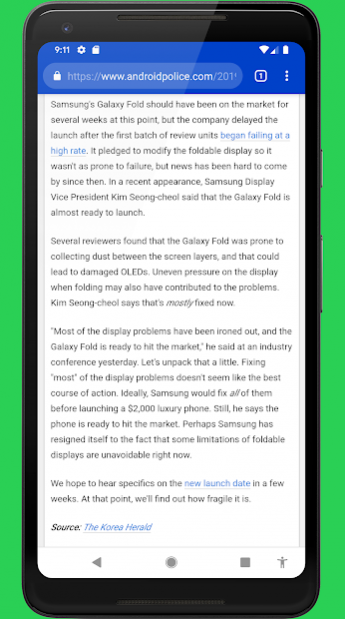
Are you tired of thumb-scrolling through social media feeds, blog posts, web pages and e-books? What if you could automatically scroll an entire page by a simple tap on a button? Auto Scroller is here to help! The app adds a new button to your navigation bar that acts as a dedicated scroll button. Simply tap this button to automatically scroll up a page of selectable length. Browsing text on your phone has never been easier! And since the new automatic scroll button is located right in your navigation bar, it is always within reach, but never in the way...
Note: In order to use Auto Scroller, your phone needs to have on-screen navigation buttons (i.e. not the physical buttons found on Samsung Galaxy S7 etc.)
Please note: Auto Scroller performs scrolling by doing an automated swipe gesture on behalf of the user. For technical reasons, this automated scroll cannot be as smooth as manual scrolling. It will be smoother if you choose a higher scroll speed.
Note: You cannot use Auto Scroller while using one of the following apps from the Android Accessibility Suite: TalkBack, Switch Access, Select to Speak and Accessibility Menu.
This app uses Accessibility services. Accessibility is used only to perform the automatic scroll gesture on behalf of the user. It is not used to read the content of your screen. Auto Scroller does not collect or share any of your personal information with third parties.
Questions/comments? Please contact me at support@phonephreaksoftware.com!
About Auto Scroller - Automatic Scrolling
The company that develops Auto Scroller - Automatic Scrolling is PhonePhreak Software. The latest version released by its developer is 1.0.4. This app was rated by 3 users of our site and has an average rating of 3.7.
To install Auto Scroller - Automatic Scrolling on your Android device, just click the green Continue To App button above to start the installation process. The app is listed on our website since 2019-07-21 and was downloaded 209 times. We have already checked if the download link is safe, however for your own protection we recommend that you scan the downloaded app with your antivirus. Your antivirus may detect the Auto Scroller - Automatic Scrolling as malware as malware if the download link to com.phonephreak.scrollbutton is broken.
How to install Auto Scroller - Automatic Scrolling on your Android device:
- Click on the Continue To App button on our website. This will redirect you to Google Play.
- Once the Auto Scroller - Automatic Scrolling is shown in the Google Play listing of your Android device, you can start its download and installation. Tap on the Install button located below the search bar and to the right of the app icon.
- A pop-up window with the permissions required by Auto Scroller - Automatic Scrolling will be shown. Click on Accept to continue the process.
- Auto Scroller - Automatic Scrolling will be downloaded onto your device, displaying a progress. Once the download completes, the installation will start and you'll get a notification after the installation is finished.
Program Details
System requirements
Download information
Pricing
Version History
version 1.0.4
posted on 2019-07-21
- bugfix
version 1.0.3
posted on 2019-06-30
- introducing more fine-grained scrolling speed control: "medium" is the old "fast", "fast" is a new speed option between the old "fast" and "very fast", and "very fast" remains the same speed.
